 |
| [Social Media Logos. Image found on Internet]
Back
in December 2014, I wrote a blog titled: “Online
Privacy and Fake Memories” [http://snapshotsandproject365.blogspot.com/2014/12/online-privacy-and-fake-memories.html].
It
was due to the fact that in December 2014; a friend (L) had called out someone about
a photo, supposedly back from the late70’s/early 80’s – which you can read about
on the above referenced blog. Turns out the kids photo was STOLEN from a
November 2014 blog. Even though the photo was backdated to 2008, on Facebook …
anyone can do that with their feature.
A
mutual friend (R) stated: “wrong, but not
really a big issue to worry about” in regards to the other friend’s
concern about the misuse of someone else’s photos.
Unfortunately,
as we saw in the case of the kids skiing photo, it didn’t stop there and was
not a victimless crime. It never really is; and it isn’t stopping either. As “L”
said – there are children involved in this that have no say.
It’s
called “Digital Kidnapping” or “Cyber Kidnapping”. Unfortunately it is a grey
(gray) area for law enforcement. Many of the laws on the books haven’t kept up
with the technology advances. Nevada just recently passed a specific law on “squatting”
(you can either research it or I will talk about it later).
As
I stated in the above blog, under an update, this was mentioned on the Today
show on 2/27/2015 [http://www.today.com/video/today/57041622#57041622]. It was even
mentioned in a news article: http://www.fox8live.com/story/28189979/digital-kidnapping-a-growing-trend
Here
is an April 2015 WHNT 19 (Huntsville, AL) news article excerpt:
“A
disturbing new trend is spreading across social media. People on social media
are stealing photos of other people’s children. It's called "digital
kidnapping."
The
term "digital kidnapping" may seem embellished to some, but the
victims who have pictures of their children stolen are left wondering why
someone would do this -- and what else are they capable of?” (Riopka, 2015).
You can read more here: “Digital
Kidnapping: Madison family finds their child targeted by online photo thief”
[http://whnt.com/2015/04/27/digital-kidnapping-madison-family-finds-their-child-targeted-by-online-photo-thief/].
Still
not convinced enough?
Yesterday
(May 12th, 2016), part two of a Dr. Phil episode featured a family
confronting the “digital kidnapper”. Warning … it is QUITE disturbing.
Here’s
the synopsis:
“Did a Stranger ‘Cyber Hijack’ a Couple’s Twins? A
Side-By-Side Photo Comparison.
April and Nathan claim a total stranger has been stealing photos
of their 4-year-old daughters and posting them as their own on social media.
In fact, they claim a woman named Ashley has stolen hundreds of
photos of the girls since they were born and has reposted them as if she were
their own mother.”
(link will be at the bottom of the blog).
Scary,
isn’t it?
I’ll
post links to the Dr. Phil videos. But, I do urge EVERYONE to read my previous
blog on it and WATCH the videos that I’ll link to later on.
In
another blog … “Social Media and Intellectual Property Theft” [http://snapshotsandproject365.blogspot.com/2015/01/social-media-and-intellectual-property.html]
I stated the following: “Another point
that was made was that the person who shared a photo that wasn’t theirs – they
weren’t the first or last person to do it, that it is a sign of the times and
it won’t change.”
As
a friend and I discussed, unless it happens to those kinds of people … they don’t
seemingly care. That’s the attitude that is going to keep it going and keep it
being “no big deal”.
There
is something emotionally disturbing about people who want to “steal” someone
else’s life or kids for an online profile. What’s worse is when they’re
confronted … they first continue the lie, perpetuate the lie, then without
emotion say “I didn’t mean you any harm” – as if that’s supposed to give the
victim the warm, fuzzy feeling. As if the victim is expected to say “oh, you
poor thing”.
In
the Dr. Phil case, the digital kidnapper (Ashley) is not really remorseful (her
lack of a real apology is apparent) and tries to keep the charade going. She
was asked by the real father of the kids (Nathan) to delete the photos some
three years ago – Ashley kept going on, even up to April 1st of this
year.
Then,
on Dr. Phil, her attitude reflects that she is supposed to be forgiven and “doesn’t
know why” she printed the photos and continued the charade. Watch the videos.
If
you (the reader) want to know how serious this is (and can be), picture this
scenario … if you will:
Doris
is a lovely, but lonely 56 year old lady. But, very lonely. She (in order to
combat the loneliness) makes up a story (after seeing a happy couple with two
kids) that she has custody of her two grandkids because their parents died in a
car crash.
She
shares pictures of her two grandkids (Janie and James) online and talks about
them constantly. As to why she isn’t in the picture with them? She says “oh, I
don’t take pictures of myself, they’re far more important to me after
everything they’ve been through”.
Her
online friend Mary sees Janie and James with another couple (at Disneyland).
Mary calls the cops because Doris is their grandma and their parents died … so
this couple must’ve kidnapped them, right? What is this couple doing with Doris’
grandkids? She didn’t say anything about the trip. After all the kids have been
through, why would Doris not take them herself?
Well
… what if Doris has been lying? What if she, like Ashley did, digitally
kidnapped Janie and James by stealing pictures from their parents’ social media
pages and reposted them as her grandkids?
And,
what would happen to Doris, Mary, the parents, and the kids when this is
uncovered?
See
what kind of trouble that can cause? Any wonder that back in December 2014 I
posted two blogs on the seriousness of this?
Now,
some might argue that perhaps Doris’ family might speak out. What if she has no
family to speak of, or is using an alias herself? How would we really know?
Here’s
the set of videos from the Dr. Phil episodes. They are in order according to the
website and “article”.
PART
ONE: “I Believe A Stranger Is Obsessed
With My Beautiful Twin Daughters and Has ‘Cyber Hijacked’ Them!” [http://www.drphil.com/shows/i-believe-a-stranger-is-obsessed-with-my-beautiful-twin-daughters-and-has-cyber-hijacked-them/;
May 11, 2016]:
“Mother Accuses Stranger Of ‘Digitally
Kidnapping’ Her 4-Year-Old Twin Daughters”
“Did a
Stranger ‘Cyber Hijack’ A Couple’s Twins? A Side-By-Side Photo Comparison”
“Woman Responds To Allegations She Digitally
Stole Photos Of Couple’s Twins & Posted Them As If They Were Her Own
Children”
“Parents Confront Woman Accused Of ‘Cyber
Hijacking’ Their 4-Year-Old Twins”
PART
TWO: “Will Ashley Confess”
“Parents Question How Framed Photos Of Their
Daughters Wound Up In Stranger’s Home”
“Woman Apologizes For ‘Digitally Kidnapping’
Couple’s Twin Girls: ‘I Really Don’t Mean You Guys Any Harm’”
“How a
Woman Used Social Media And Her Deceased Mother To Perpetuate A Story About
Having Twins”
I
apologize if this blog is almost like a newspaper (or magazine) to read. I urge
everyone to watch the videos above and follow basic steps for protecting one’s
family. What do I do?
1.)
I don’t allow many people access to my account. Not because I don’t have
several requests – I don’t know some of these people. I am not going for a “most
friends of all time” award. I want to know and interact with REAL people. If
they’re not someone I know (either we have a mutual friend; I’ve really met
them; or I can vet them) – I say “NO” to that friend request.
2.)
I am not comfortable allowing people to know where I live – after all, I don’t
know some of these people. I keep my Facebook LOCKED down by posting all “sensitive”
stuff to only those who have my address or who I’d let know where I live (family,
close friends).
3.)
I am not about to let strangers know when I am not going to be at home. So, I
keep that only for family (cousins, uncle, and my mom) and a few friends (who
are just as close as my family). That’s who I’m going to also show my vacation
posts to and pictures of my kids to. It also cuts down on potential suspects.
4.)
Watermark photos with something. Keep the originals in a safe place other than
a computer (flash drive works well and if you can on DVD, holds more than a CD).
Try to be accurate with the file dates.
5.)
Watch out for groups on Facebook. Predators can lurk here – which is obviously
what happened to the Willis family.
6.)
Never refer to kids by full name in a public post. Use Twin/Triplet #1;
Daughter #1; DD (dear daughter) #1; kid#1 (if family has multiple boys and
girls). Things like that. Also don’t reveal real birthdays.
7.)
Watch the frequency and type of postings.
I
said the following in another blog, but true here …
8.)
Don’t be available in search on Facebook
9.)
Set “friend requests” to “Friends of Friends”
10.)
Maintain the strictest possible privacy on Facebook and Twitter
A.) Don’t be afraid to have lists on
Facebook
B.) Don’t be afraid to de-friend or
block on Facebook
C.) Don’t be afraid to contact
authorities either
D.) Don’t be afraid to have one public
Twitter and one “family only” account. FYI: I think Twitter needs to have a
family only list or option.
11.)
If anything seems suspicious – REPORT IT IMMEDIATELY!!! Don’t forget to do your
homework, take screenshots, keep emails.
As
I said in a previous blog:
“Just
because something has been done (and repeatedly) doesn’t mean we should allow
it to continue. We can take precautions by limiting what we do online to impact
that privacy. We can make reports against people as well.
I
don’t think we can stop it entirely, but there is nothing wrong with being
vigilant about it and educating our friends to being a bit more cautious
online.”
But,
we should encourage legislators to pass stricter laws and penalties. Laws are
useless without enforcement.
I
do urge people to exercise as much caution as possible. And, as I also said:
This
is not just a "minor" matter. This crime has a name. And, there are
victims. And, those victims may be too young to speak for themselves.
|
Showing posts with label Twitter. Show all posts
Showing posts with label Twitter. Show all posts
Friday, May 13, 2016
Online Safety with Kids and Digital Kidnapping

Monday, December 7, 2015
31 Days of Cheer (Now 24 left)
Sometimes
during the holidays (or any other time of year) … there seems to be “photo”
challenges. Some I like, some I don’t. I do the #TBT (Throwback Thursday) ones, and sometimes #WBW (Way Back Wednesday) or #FBF (Flashback Friday).
However on the last day of the month I usually do the “gas prices”.
This
year, the city I live in decided to do #31DaysofVegasCheer. I of course, living
in a suburb, and wanting to spread the cheer all over, decided to shorten it to
#31DaysofCheer.
Here’s
the idea – take a picture each day and post it to Instagram, Twitter, or
Facebook with the tags #31DaysofCheer and the item or “idea” for the day:
 |
| [Photo is property of City of Las Vegas, Nevada] |
The
last time I did something like this was in 2012, which you can read about it
here:
“Christmas Photo Challenge”
I
started on day #2 as on the first day I had another more important picture.
However, since then I have been able to keep up with the “challenge”.
This
fits quite well into my “Project: 365” daily photo challenge. I’m using Fotor
to add borders and filters to the challenge photos to bring a unique quality to
them.
They
can be items in your home, decorating the tree, things like that. They don’t
have to reveal locations or family information.
Here
are a few examples from 2012 and this year:
 |
| [Photo belongs to me. This was December 4th – #ChristmasDecor #ChristmasPhotoChallenge. This was used with an Instagram filter] |
 |
| [Photo belongs to me. This is December 7th – #31DaysofCheer #WrappingPaper. Used a Fotor filter] |
Since
I use a planner, I went and wrote in what I needed so I didn’t have to keep
looking at the photo. And, I use the planner to record the photos and sometimes
the file number …
So,
from today to the 31st, here are the “ideas”:
December
7th – #31DaysofCheer #WrappingPaper (completed)
December 8th – #31DaysofCheer #Green (completed)
December 9th – #31DaysofCheer #Family
December 10th – #31DaysofCheer #Presents
December 11th – #31DaysofCheer #Stocking
December 12th – #31DaysofCheer #CandyCane
December 13th – #31DaysofCheer #Tree
December 14th – #31DaysofCheer #Santa
December 15th – #31DaysofCheer #BeautifulSight
December 16th –#31DaysofCheer
#FavoriteHolidaySong
December 17th – #31DaysofCheer #Peace
December 18th – #31DaysofCheer #MerryandBright
December 19th – #31DaysofCheer #Tradition (completed)
December 20th –#31DaysofCheer #Tree (this is a
repeat, so if you want to vary it with say a tree cookie, tree ornament, or a
different tree, go ahead)
December 21st – #31DaysofCheer #Joy
December 22nd – #31DaysofCheer #BrightLights
December 23rd – #31DaysofCheer #Candles
December 24th – #31DaysofCheer
#HolidayGreetings
December 25th – #31DaysofCheer
#ReasonforSeason
December 26th – #31DaysofCheer #Sparkly
December 27th – #31DaysofCheer #FavoriteThing
December 28th – #31DaysofCheer #BlackandWhite
December 29th – #31DaysofCheer #HolidaySplurge
December 30th – #31DaysofCheer #Reflection
December 31st – #31DaysofCheer #Celebrate
Just
putting this out here for a way to spread Christmas joy and cheer. We seem to
need a little more this year!
You can see my photos on Twitter: https://twitter.com/MarieEdwards429
I don’t share very many photos there, but since it is the holiday season ... I think it's a great idea! And, if you have one ... you can try it with your Elf on the Shelf.
Happy
Hanukkah, Merry Christmas, Happy Holidays, Season’s Greetings, and Happy New
Year!
Thursday, May 14, 2015
Torino Day
Not everyday you see this:
 |
| [Thankfully I went in the back of the strip mall and not the front.] |
As
some may not know, “Car Stars” is going to be the weekend of May 14th
to May 16th. It’ll feature a lot of the cars from movies and TV
shows.
What
was interesting is I was on the fence about going. But … it took a little
convincing today, and I feel compelled to go downtown to see the cars.
Why?
Well
… I had some unintended errands today (May 14th).
On
Monday (5/11), I put my car in for a few repairs and maintenance work. One of
which was to replace my faulty hazard light switch. It stuck and I couldn’t use
it. Either it wouldn’t turn on, or once on … it wouldn’t turn off. So, I bought
one and asked the dealership to put it on while they were doing everything else
(hoses, spark plugs, radiator flush, oil change, brake cleaning and adjustment).
Got
my car home Tuesday, and Wednesday decided to use it and park my rental (which
I was going to have for a week). Well, Wednesday night, I engaged the hazard
lights to check on something. Disengaged and this happened:
 |
| [Obviously there is something wrong here ... my original one lasted for seven (7) years and didn't do this] |
 |
| [There's something amiss here ...] |
Yeah
… where’d it go?
So,
I parked it, grabbed my rental and left to get my mom from work. Now, this
story takes a stranger turn before I get to today …
I
also put in a laptop for an LCD screen replacement and to replace the hard
drive which had been buzzing and crackling on Monday. It was ready on Wednesday
as well. But … the USB ports? Couldn’t use them. Before the service, they were
okay. Now? Nope … they don’t work.
 |
| [This is not good ... ] |
Okay, so that has to go back as well. And, here I was hoping to have one day where I could stay at home and do nothing.
Today
…
I
get my mom to work and my car to the dealership. And, I get a ride home via the
courtesy shuttle. Of course there are three drop-offs before me. Finally got
home about 12:30pm. Get my stuff in my
rental and head over to the computer repair place. I decided to take the back
way in through Sunset Station. And, was I glad I did …
 |
| [At first I thought I was drunk, then I remembered the last alcohol I had was 3oz of beer a week ago] |
 |
| [The one on the left is registered in Nevada. That was the car that was being shot at when Stiller/Starsky said "stop shooting at my car". The one on the right is registered in Louisiana and was crashed closer to the end of the movie.] |
Yup!
Those are “Starsky and Hutch” Ford Gran Torino cars. One is registered here in
Nevada, and the other is registered in Louisiana. I stopped to take a few
pictures and went to drop off my laptop.
At
first it was a simple issue – then nope … might take longer. So, I decided to
leave the laptop and head home to get my memory card (which I left in my other
laptop). But, I encountered the owners of the cars. That wasn’t the only
person. There was a guy by the name of Steve who had the car in New Jersey
(where he lives). His was the TV series car that Paul Michael Glaser (Starsky)
drove in seasons 2-4.
These
Torinos were from the 2004 Ben Stiller (Starsky) and Owen Wilson (Hutch) movie.
And, this was the first time the cars were reunited since then. That movie was
released in 2004, so that was 11-12 years ago.
Since
the guys were about to leave I decided to grab my phone and use it. Steve said
it was a good camera and I was praying he was right. And, he was. I didn’t have
to ask for a picture by the car he offered. I looked terrible, but I did it
anyway. And, I am not posting it. But, here are a few photos:
 |
| [Owen Wilson (Hutch) autograph on the trunk of the Louisiana Torino] |
 |
| [Ben Stiller (Starsky) autograph on the trunk of the Louisiana Torino. He is right, it is the best car ever!] |
 |
| [From left to right: Antonio Fargas (TV series Huggy Bear); Fred Williamson (2004 movie Captain Doby); and David Soul (TV series Hutch) autographs] |
 |
| [Better view of Antonio Fargas' autograph] |
 |
| [Paul Michael Glaser (TV series Starsky) autograph] |
 |
| [Fuel door. Nevada license plate is ZEBRA3; which was Starsky & Hutch's call signal] |
 |
| [Curve of the stripe] |
 |
| [Point of the stripe and the GRAN TORINO badging] |
 |
| [Front end of the Torino. Very impressive in person. Gorgeous car.] |
I
was asked by Steve and the owner of the Louisiana Torino if I was going to be
at “Car Stars”, and I honestly replied “I don’t know”. They both insisted I had
to come down there tomorrow and the owner of the Louisiana Torino added “please”.
How can I refuse that?
Anyway
…
The
owner of the Louisiana Torino was a great guy and he showed me the engine (351
Windsor) and told me the stories of both cars.
 |
| [351 Windsor engine on the Louisiana Torino. 460 was too heavy for the stunts. The current owner bought this from someone who had bought it from Steve. This car originally had a V6, not a V8.] |
I couldn’t ask to meet such
wonderful people. And, this was something I hadn’t planned on. In fact, I was a
bit miffed at having to return my car and computer back to get repaired …
again.
Had
those events not happened … this day would have turned out a bit different – so,
that is something I’ve come to realize – things happen for a reason. We can’t
question them. It’s a higher purpose. If y’all don’t believe, that’s fine – don’t
bash those who do.
But,
I learned so much about the cars. As much as I don’t like the movie, I had to
respect the cars and their history. I feel blessed to have had a “private”
lesson in that history. And, I got to be a part of that moment.
I
apologized for taking so many photos, but Steve said it was cool and the owner
of the Louisiana Torino said “that’s why we have them here. Most
of the time they’re in the garage”. I don’t doubt it. They’re special cars. So,
they were appreciative that I stopped and was interested in the cars and took
my time to photograph them and listen to the stories.
And,
that is why I carry my camera at all times. It’s also why something like “Project:
365” is SO important – life happens. Memories happen, we need to take the short
time we’re given to enjoy the moment we’re living in – it won’t happen again.
Sunday, January 18, 2015
Hiding on Twitter … Private vs Public Profiles
 |
| [Various Social Media Logos] |
How
I’d LOVE to hide on Twitter.
Before you ask why (or what) … I’ll ask (and answer):
“What does this have to do with snapshots or Project: 365”
… quite a bit if you’ve read the last few blogs:
That’s
where I presented the pitfalls of having a profile picture of myself and an actor
and how it led to a bit of a misunderstanding with me and another one of his
fans. She was a French speaking fan, and I had to use Google Translate, and a
slight language barrier.
While
it turned out with a positive ending (she blocked me when I replied to her in response
to her messages to me), it was a wake-up call.
Project: 365 – Privacy and Social
Media
This
blog is where I stated why I preferred using Facebook over Twitter to share
pictures on – highlighting the privacy settings of Facebook, and how I may not
continue the project on Twitter in light of certain events related to “photo
stealing”.
Social Media and Intellectual
Property Theft
This
is where I discussed the severity of something that happened in December 2014,
and why it was a bigger issue than some people thought.
In
this research, it led me to an incident in New Mexico where a woman is suing
artist Anne Taintor for using an old high school photograph with a snarky
message on a flask.
One
of the many articles I referenced:
“NM woman sues over yearbook photo, novelty flask”
“NM woman sues over yearbook photo, novelty flask”
And,
how we can set about changing the “sign of the times …
this will never change” mindset by awareness, education,
vigilance, and privacy.
Finally … the one that started it:
Online Privacy and Fake Memories
This
is where I discussed how the discovery of a modern digital photo was used to
represent kids from “long ago” (circa 1970’s) and one of the people mentioned
in it commented on it to perpetuate the “fake profile” theory.
However,
the blog highlighted bigger problems than someone using it to validate another fake
profile.
I
mentioned how a friend’s Facebook post about the photo highlighted the
complacency a few friends took with regard to online safety and being aware
that some people are not at all who they seem.
In
addition, it highlighted the need for perhaps making profiles more private, and
watching what we share and WHO we share that information with.
This
is where this blog is heading …
I
never give out personal information to people I don’t know. I certainly don’t
post my address online, my telephone numbers, my email addresses. I try not to
show too many family photos (unless the family is deceased) on Twitter. I try
to keep it for public use – things I don’t mind letting out because they might
come out any way or would be out as a result of being in a public place such as
a theme park, racetrack, mall, etc.
My primary profile is on there to interact on a personal level with friends and some businesses, etc. With businesses I share good experiences, compliment service, and sometimes complaints.
My primary profile is on there to interact on a personal level with friends and some businesses, etc. With businesses I share good experiences, compliment service, and sometimes complaints.
I
do have a secondary account which is a business account. I haven’t been using
too much here lately. I’m hoping to begin focusing on that in the near future.
I
save Facebook for family and VERY close friends – sometimes it is family only
depending on the content I am sharing.
On
Facebook and Twitter … I also like to post my “picture of the day” or rather
“Project: 365” photo.
Given
what I learned in December, I’m hesitant about sharing my photos on Twitter. On
Facebook, I have greater privacy controls for the reasons stated here and in
the blogs too.
With Twitter my profile choices are either:
With Twitter my profile choices are either:
PRIVATE
PUBLIC
I’d
like to be to select the “PRIVATE” option as Twitter doesn’t have detailed
options, nor a “share direct” feature like Instagram does.
I run into certain problems if I choose a “PRIVATE” profile:
I run into certain problems if I choose a “PRIVATE” profile:
1.)
Unless people are following me, there’s a good chance they won’t see my tweets
if I were to tweet a reply to them or a general “hi, great service” kind of
tweet
2.)
I can’t interact for the purposes of giveaways (yes, I enjoy those)
3.)
People who want to follow are often turned off by the “PRIVATE, PROTECTED
TWEETS” status– I’ve been blocked as well during the short time I had a “PRIVATE”
account – the only reason? PRIVATE account.
Some
celebrities have even taken issue with those who have “PRIVATE PROFILES” when
you follow them. This I know firsthand from reading a particular celebrity’s
tweets, and no I am not going to name them. They, like most of us, have their
reasons.
As I stated in one of the blogs …
As I stated in one of the blogs …
“that
doesn’t sit well with some potential followers, even famous people. Some have
openly expressed the fact they feel that by asking to follow someone on Twitter
it is an audition of sorts and one stated “why be private if you’re going
to be online”. They feel
you have something to hide …”
Of
course I have something to hide (like others) – but not for the wrong reasons.
Some
people are “PRIVATE” on Twitter because:
1.)
Perhaps they don’t want to share their life or memories for someone else to
steal them (as what I have shown in previous blogs and mentioned here)
2.)
Maybe they have a stalker (or someone who is bullying them) and don’t want them
to know where they live or what is going on. After all, they shouldn’t have to
give up living their life in order to accommodate a stalker or bully, that’d be
re-victimizing them over and over.
3.)
Perhaps it is a military family member who is keeping in contact with their
family/friends back home; or the other way around (OpSec and all)
4.)
It might be a teen’s account and being private is part of an agreement between
parent and child in order to have the account – usually the account is for
interaction with long-distance family and friends; family-friendly
accounts/content; etc.
With
that said, celebrities should know #2 more than anyone. They can always elect
to block the “private” person or simply ask “why do you have a private profile”
before blocking. I’d have no problem explaining why, as most honest people
likely would. It is their choice overall – just something to consider.
They
should also understand #3 as well – after all the good guys aren’t the only ones
who use Twitter or social media. Don’t we all know about “loose lips sink
ships” – Operational Security (OpSec)?
Number four (4) could be viewed as responsible parenting
and responsible use of social media. It should be applauded as a way to keep
kids safe while learning about the “online world”.
Personally,
I would like a feature that Facebook offers: being able to create lists of who
to post what content to. That’d make Twitter better and safer as well. But, I get the point. Some people are just leery of those who want to be private. I get it, but there are cases as to why private profiles exist.
As
I also said in my other blogs, I get that each social network wants to be
different (it’s why some users favor one over the other). When it comes to
privacy, that’s where you can’t have just two choices, it’s not feasible. Even Google + (G+) has
“circles” you could create to post specific content to – if the person wasn’t
in the circle, they didn’t see the content.
In
an age where we’re trying to be so connected, we end up connecting with the
wrong people. In some respect we’re all bullied near daily – whether it be on a
Facebook post about our reaction to a devastating and somewhat personal event,
or something we might feel strongly about … each day someone will get bullied. Privacy
settings help us stay connected to those we want to and stay away from those we
don’t. They are essential to controlling the way we interact and protect
ourselves – even how we protect our family.
Facebook
has greater privacy control than Twitter. Even Instagram has better privacy control
options (at least on the phone app).
For
our safety, we’re told to lock down our social media, but yet we’re ostracized
for doing so or made to feel bad for doing so. As an adult, that is confusing.
To a child? I can’t even imagine where their level of confusion would be with
“lock down your social media, what are you hiding for, why are you being
private while online?” I’m confused. But, I’ve read it. On one hand people tell
you to watch what you post on social media, but they ask why you’re being so
secretive.
That
makes NO sense to me. Those who know me will tell you – I’m pretty darn smart
(even my college transcripts indicate that), and I catch on quickly.
I’ve
had protected accounts follow me; usually there isn’t a problem when I ask to
follow them. Most people approve it within 24 hours. If I send a request and
they accept, fine it’s all good. After all, I can always block them if I don’t
like their content. If they don’t approve my request in a timely manner, I will
block them – haven’t had to do that too often though.
Here’s
how I look at it on Twitter … unless you’re comfortable with me following you
back, don’t follow me. I don’t mind asking to follow someone with protected
tweets. It isn’t an audition – it is in most cases for their safety and
security – and I respect that – just as I would expect my privacy, safety, and
security respected as well.
So,
the next time someone asks any of those questions on Twitter (“why do you have
a private profile”, etc.) … I might just direct them to this blog as it’d take
far too many tweets to explain it.
And,
when someone suggests I protect my tweets, I’ll also direct them here –
sometimes it isn’t as easy to explain as it seems.
Thursday, January 8, 2015
Unwanted Attention – Privacy, Special Photos, and Social Media
Lately
it seems that a lot of “social media” stuff is inspiring my blogs –
particularly the photography ones. That I apologize for. I’d hoped to be
talking about fun stuff – and I’m going to try to get back to that as soon as I
address a few issues.
These
are things that have happened to me over the last several months (some days apart)
and some I’ve been part of. But, I’d like to let people know what’s been going on.
This
latest incident started off on January 3rd with a Facebook message to me … in
French.
First
of all, my name maybe French (and I am of French descent with a mix of several
other things – Native American, English, etc), but I am an American. My mom’s
family roots go back to the Revolutionary War. I also only speak English (or
American as I call it). So, needless to say, I was perplexed as to what was going
on and what this woman was trying to ask – in addition – why was she trying to ask it
of me?
This
was not someone I know, but obviously was a fan of the same actor I am a fan of,
one that I recently met as well.
Apparently,
because I had made a comment on one of the actor’s Facebook posts (and who
hasn’t), and because my profile picture is that of me and said actor … this
“fan” messaged me.
As
of note … I am not the only person to comment on a celebrity’s Facebook
page/post or tweet a celebrity – though I don’t do it very often. Usually it is
a “thank you” or compliment on an episode of their series (mainly I interact
with them on Twitter).
Many
people do it and some celebs love interacting with their fans (at least the
respectful and polite fans). Dale Earnhardt Jr. and other NASCAR celebrities
often do impromptu “Q & A” (question & answer) sessions with the fans.
After
all, they wouldn’t post a “what do you think”, “what kind of questions do you have”, or post if they didn’t want
comments or the interaction.
I
am also not the only person who has used a picture of themselves with their
favorite personality as a profile picture – scour Facebook or Twitter, and you
will see it. I know of a few friends who have their profile photos set to that
of them with their favorite celebrity. It’s nothing new. And, they have been doing it
for years. There is nothing dishonest about it, so long as you are not pretending to be officially associated with that celebrity; i.e: wife, significant other, sibling, etc.
With
that said …
I
looked at the message and was like: “what is this, how do I reply”.
As
it turned out she obviously thought my personal page was the actor’s page
(perhaps she thought it was his personal page). Why I have no idea, as he has
his own “professional” page; mine is “personal” with my real name. She was
apparently telling me how much she loved the actor (thinking I was the person)
and things of that nature. Things she’d expressed in numerous (at least 4-5)
comments to the actor on the same post I’d commented ONCE on.
I
wanted to reply to tell her that I didn’t know what she was saying and
obviously I had no official connection to the celebrity (rather than misled her
into thinking so). So, I took to Google translate to find out what it was she’d said to me.
I
politely told her that I was not connected to the actor and that I was just a
fan who’d been lucky enough to meet him over the summer, and that was where
my profile picture originated. I explained that I used Google to translate and
apologized. Simple, done. I thought that
would end it.
It
didn’t.
The
next morning (January 4th), I got another message from the person.
That one I didn’t even know what she was asking. It translated to “you find out
how”. Maybe she was wondering why I was replying to her, forgetting she had sent me the message the day before (hey, it could happen; only thing I have to think of).
Not knowing French (or another language) is a barrier to politely solving
the issue. When you don’t know what someone is asking, you don’t know how to
reply without risking an insult.
And,
you also don’t want to risk agitating the person either (not knowing if it is an innocent inquiry or a sinister investment).
Again,
as politely as I could … I told her I didn’t know what she was asking/saying;
that I wasn’t officially connected to the actor; and apologized for the
confusion. I hoped that would end it. I know she (or someone on the account)
saw the reply 4-5 minutes after I posted it. I was hoping that would definitely
be the end of it.
As
with most things of this nature, I got to thinking … and that wasn’t good in
this case, or in any case.
That
picture that people treasure of themselves and their favorite celebrity/person
(actor, NASCAR driver, musician, etc) might attract unwanted attention from
others – especially when used as a profile photo.
While
it is a treasured photo, and definitely one to be proud of, it paves the way
for this kind of attention/interaction. Some of that might be innocent and some
not so innocent.
When
I first planned this blog out I had no idea what her motives were and was
prepared to “block” if necessary. I am of course no stranger to blocking
people. I’ve had to for various reasons.
On
the early morning of January 6th I checked to make sure she hadn’t
replied to me. I noticed “You cannot reply to
this conversation” at the bottom of the message thread.
I
was filled with more relief than shock.
Apparently
she blocked me almost two days after my reply to her. So, that ended quite well
– which is good. This is a story with a positive ending and for that I am quite
relieved. At least I don’t have to worry what her motives are or worry about
any future contact from her.
This
is not a new issue, at least not for me.
It
started not long after my trip when there was an incident about the cover photo
I chose for my “Twitter” cover. Turns out it was a misunderstanding as the
person had no idea it was a replica license plate of a car from one of my
favorite TV shows. That I wrote about in another blog:
“How a Photo & Memory Led to a Twitter
Hiatus” [http://snapshotsandproject365.blogspot.com/2014/08/how-photo-memory-led-to-twitter-hiatus.html]
 |
| [Seemingly innocent photo I took in June 2014 in New Jersey. Set off a series of events that almost led to me leaving Twitter] |
This most recent incident is going to make me hesitate when choosing a particular profile/avatar photo to represent myself
on social media accounts. I’m also going to hesitate on “Project: 365” when it comes to posting on Twitter. As I’m sure some people would hesitate (about the profile photo that is).
When
using one of yourself, you identify as a real person and are more credible to
others. You’re a real person (well, when you use a real photo of yourself that is).
When
you have one of yourself with someone famous you met – there are some bragging
rights and pride, not to mention it is a memorable event that you want to share with
family and friends.
But,
you also run the risk of unwanted attention – such as this message from a
“fan”. That may not be a good thing in the long run, depending on their motives.
If
you use a “generic” photo it gives you some privacy and anonymity, though you
risk being labeled as a phony or fake; even in some cases a stalker.
There’s
really no winning in this one.
This
person who I’ll refer to as “Elin” – is using a generic photo on their account.
And, this is not their only Facebook account – they have another one (that they
are friends with) under the same name (again, with a generic picture).
That
was another concern about her interaction with me – the anonymity, and after
some of the things I and a friend have been through over the last few years –
it is creepy.
Thankfully
(and I am hoping) this was a misunderstanding.
But,
there is a lesson here:
Watch
the profile pictures and be careful. You can inadvertently attract the wrong
kind of attention. I got lucky in my case and this time.
The
“attention” was something I hadn’t even considered when choosing the photo for
my profile over six (6) months ago.
As
of note, my profile picture on Twitter is my normal Facebook cover photo:
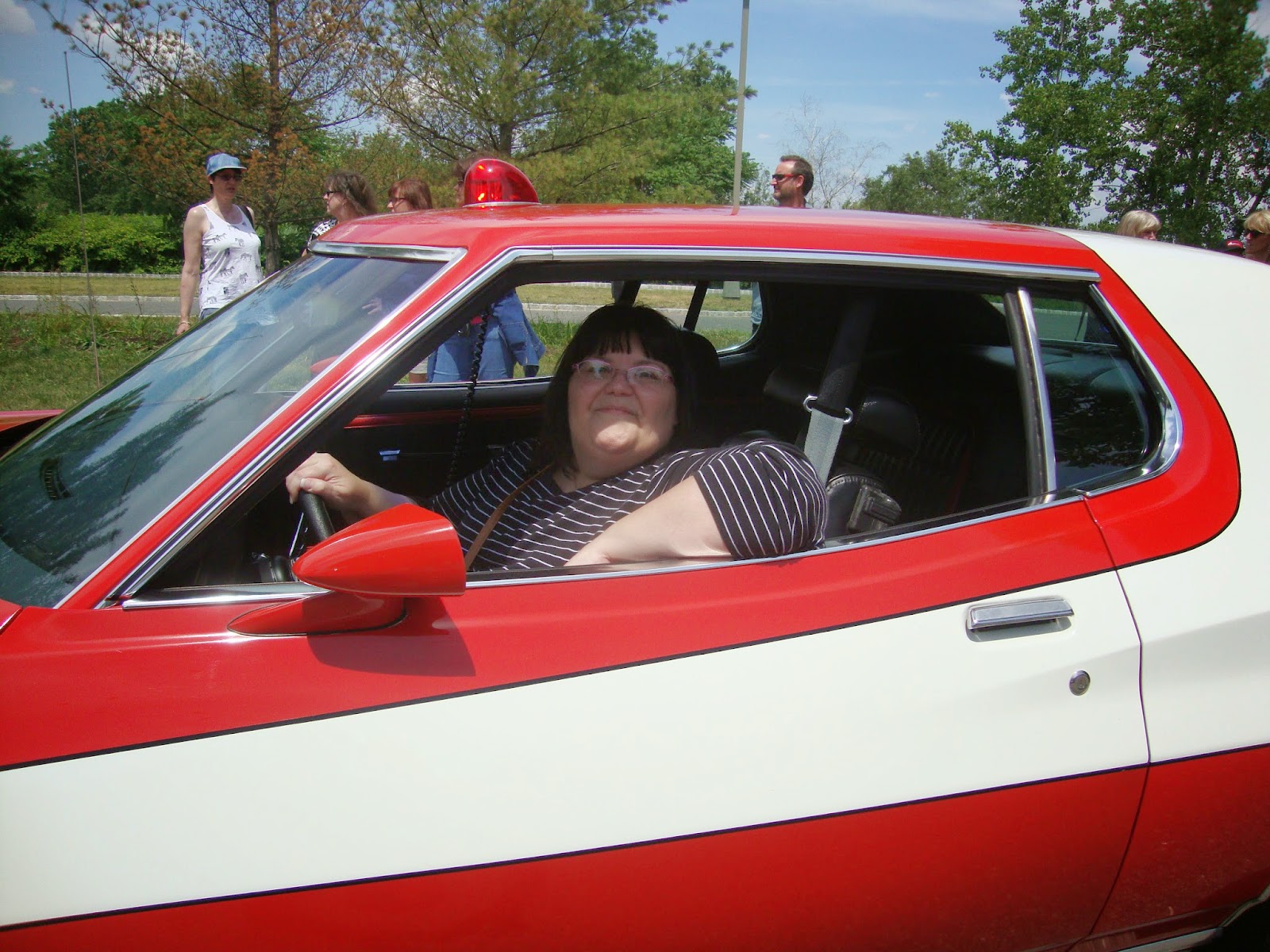 |
| [This is the REAL me sitting in a replica of a famous TV series car. This was taken in New Jersey in June 2014] |
I’ve
been lucky with that profile photo … so far.
Subscribe to:
Posts (Atom)